Delphinium Limited

Legacy system modernisation

Your business still runs on it. Nobody dares touch it.

We take legacy systems onto modern, fully supported technology, and keep your database, your data, your history, your reports and the bespoke way your business works. Done properly, with AI doing the heavy lifting, a year of rewriting becomes a few weeks.

What you have now

What you would have

Why now

A system is rarely a problem because it is old. It is a problem because the platform under it stopped being patched, the people who wrote it moved on, and the attackers did not.

31%
of data breaches now start with somebody exploiting a software vulnerability. It has overtaken stolen passwords as the most common way in.
Verizon Data Breach Investigations Report 2026
43%
of UK businesses were breached or attacked in the last twelve months. Among large businesses it is 69%.
UK Cyber Security Breaches Survey 2025/26
3–4×
what it can cost to keep an old system running, set against a modern one doing exactly the same job.
UK State of Digital Government Review, 2025
28%
of central government systems are still classed as legacy — up on the year before, and as high as 70% in places. Private estates are no better, they are just less often counted.
UK State of Digital Government Review, 2025
22%
of those legacy systems are rated red: high likelihood of failure and high impact when it happens. More than a quarter of the red ones have no money set aside to put right.
UK State of Digital Government Review, 2025
£3.13m
average cost of a data breach at a UK organisation. In financial services it is £5.46m. Most businesses would not come back from one.
IBM Cost of a Data Breach Report 2026, UK figures

For some end-of-life products there is no patch coming at all. Where a flaw is being actively exploited and the vendor has walked away from that version, the official advice is to disconnect it — which is sound, unless your business runs on it.
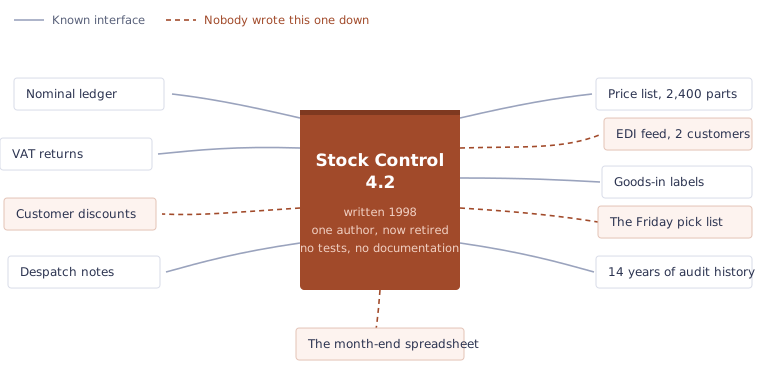
Diagram: a 1998 stock control application at the centre, with ten things connected to it including the nominal ledger, VAT returns, the price list, despatch notes, audit history and the month-end spreadsheet. Four connections are marked as undocumented.
This is why it is still running. A system that has been in place for twenty years is never one system. It is the stock, the prices, the VAT return and the one spreadsheet somebody built in 2009 that the month-end depends on — and nobody has a complete list. Replacing it wholesale means finding every one of those threads under time pressure, which is why so many rewrites stall. We map them first, while the old system is still running, and move them across one at a time.

What changes

The system your people know stays the system your people know. What changes is everything underneath it.

Now

Desktop onlyInstalled on machines, in one office
Unsupported underneathNo security patches, no vendor left to ring
Rules buried in screensUndocumented, untested, one person who knows
Weak access controlShared logins, passwords in plain sight
Nothing joins upNo interface, so everything goes via a spreadsheet

After

Browser and phoneWherever the work actually happens
Supported and patchedCurrent full-stack technology, maintained libraries
Rules in a tested layerWritten down and covered by automated tests
Security by defaultMulti-factor sign-in, least privilege, encrypted, audited
Open to integrationA proper API, so other systems can be told things
Carried across, not thrown away

Your database. Your historical data. Your ad-hoc reports and the spreadsheets people actually live in. The odd little rules that make your business yours — those are an asset, not technical debt.

What you keep when you migrate

This is the part that worries people most, so we will be plain about it. Modernising is not starting again, and it is not bending your business to fit somebody else's package.

Your database
We work with the database you already have. Where it needs tidying we tidy it, with you, rather than replacing it on principle.
Your data
Every record comes across. Nothing is stranded in a system nobody can open any more.
Your history
Years of historical information stays queryable, stays reportable, and stays where your auditors expect to find it.
Your ad-hoc reports
The queries and spreadsheets people rely on keep working. We find them, we understand them, we carry them over.
Your bespoke processes
The rule somebody added in 1998 for a very good reason stays — documented this time, so the next person knows why.
Your integrations
The feeds, files and interfaces to everything else keep running right through the changeover.

How we do it

Stages one to three are where the project is won or lost. The AI only earns its keep once they are done properly.

Pointing an AI at your source code and hoping produces a modern-looking copy of a system nobody understands.

Understand

We read every line, and we learn how the business really works — which is usually not what the documentation says.

Map

Data, rules and flows written down and agreed with your people before anything is touched.

Design

The target architecture, the stack and the standards are settled first. The right technology for your business, not our favourite one.

Convert

AI does the heavy lifting inside that framework, at a pace no team of developers can match, reviewed as it goes.

Prove

Old and new run side by side on real data until the results match. If they do not, you are still on the old system.

Go live

Migrate, train and support, then hand over clean, documented code that somebody else could pick up.

How long a migration takes

AI collapses the part of the job that was always the most expensive and the least interesting: the line-by-line rewriting.

Conventional rewrite — hand-coded, screen by screen
9–18 months
Understood first, then converted — same scope, same data, same rules
4–12 weeks

Indicative. Real timescales depend on size, complexity, the state of the data and how much you want changed along the way. A six-month job can come down to a week of coding; we will tell you honestly which one yours is before you commit to anything.

Cost falls with it
Less elapsed time means fewer billed days. That is not a discount on the same work — it is work that no longer needs doing by hand.
Security you can evidence
Supported frameworks, patched dependencies, proper authentication and encryption — the things your insurer, your auditor and your customers now ask about in writing.
Performance and headroom
Modern runtimes and data access are simply faster. Reports that took minutes take seconds, and there is room to grow.

Thirty years of legacy systems

The hard part of a conversion is never the syntax. It is knowing which undocumented behaviour is a bug and which one three departments quietly depend on.

We are not newcomers who have just discovered old code. Delphinium has spent more than thirty years in and around the languages, databases and products now called legacy. We have written these systems, supported them, argued with them at two in the morning, and converted a good number of them.

There is a genuine minefield of tooling and advice about at the moment, most of it selling something. Part of what you get from us is somebody who will steer you through it and tell you when the answer is “you do not need that”.

What we migrate from

If any of this sounds like yours, we have converted one before. If you are not sure what you have, describe what it does and we will work out the rest.

Desktop applications

  • VB6
  • Visual Basic forms
  • WinForms
  • VB.NET
  • Delphi
  • PowerBuilder
  • FoxPro
  • Visual FoxPro
  • Clipper
  • Client–server systems

Web applications

  • Classic ASP
  • ASPX
  • ASP.NET Web Forms
  • Early ASP.NET MVC
  • ColdFusion
  • Early PHP

Spreadsheets and Office

  • Excel applications
  • Excel VBA and macros
  • Microsoft Access
  • Access forms and reports
  • Word templates
  • Lotus Notes

Green screen and mainframe

  • COBOL
  • AS/400 and iSeries
  • Terminal and green-screen systems
  • Batch and overnight processing

Databases behind them

  • SQL Server
  • Oracle
  • Sybase
  • DB2
  • Btrieve
  • Paradox
  • dBase
  • Interbase
  • Flat-file and indexed stores

Industries we have done it in

  • Funds & equities
  • Life & pensions
  • Finance
  • Manufacturing
  • Stock control & invoicing
  • Accounting
  • Estimating
  • Construction
  • Transport

What we have worked on

1990s

VB6, Visual Basic forms, Delphi, Clipper and FoxPro. Green screens and client–server.

2000s

Classic ASP, ASPX and WinForms. Access and Excel quietly take on jobs they were never meant to do.

2010s

Web frameworks, mobile, services and the first real APIs. Reporting moves off the server.

Today

Modern full-stack technology, cloud or on-premise, AI-assisted conversion. Built to be changed again.

We have worked with

  • Friends Provident
  • Barclays Stockbrokers
  • Daikin
  • Transport for London
  • Trueform
  • FE

Straight answers

The questions we get asked in the first ten minutes of every conversation.

Will the business have to stop while this happens?
No. Old and new run side by side on real data until the results match, then you cut over at a time that suits you. If it is not right, you are still on the old system and nothing is lost.
Nobody here understands the old code any more.
That is the normal starting position, and it is one of the things AI is genuinely good at — reading a very large amount of unfamiliar code quickly. We turn it into documentation you can actually read, which some clients value as much as the new system.
What do you convert from?
Desktop applications in VB6, Visual Basic forms, WinForms, Delphi, PowerBuilder, FoxPro and Clipper. Web applications in Classic ASP, ASPX and ASP.NET Web Forms. Excel applications and VBA macros, Microsoft Access databases and Lotus Notes. COBOL, AS/400 and green-screen systems. Behind them, SQL Server, Oracle, Sybase, DB2, Btrieve, Paradox, dBase and flat-file stores. If you are not sure what you have, describe what it does and we will work out the rest.
What technology do we end up on?
Current, mainstream, fully supported full-stack technology: a modern web front end, a proper service and API layer, a supported database platform, and cloud or your own servers as you prefer. We choose the stack to suit your business and whoever will look after it — nothing exotic, nothing that only we can maintain.
Do we end up locked in to Delphinium?
No. You get clean, documented, tested source code on mainstream frameworks, and your own team or any other supplier can pick it up. We would rather you stayed because you want to.
How long does a legacy migration take?
A conventional hand rewrite of a mid-sized line-of-business application typically runs nine to eighteen months. Understood first and then converted with AI inside a designed framework, the same scope typically runs four to twelve weeks, depending on size, complexity and the state of the data.
How do we find out what ours would take?
Tell us what you have got. We will look at it, tell you what we find, and give you an honest view of scope, time and cost before you spend anything meaningful.

Tell us what you have got

What it is, roughly how old, and what it is costing you — in money, in risk, or in sheer frustration. We will come back to you within one working day with a straight view of whether it is worth doing.

Or email us directly at
[email protected]

We use what you send here to answer your enquiry, and for nothing else.